How can I delete/withdraw my Uniqlo Membership account?
We are sorry to hear that you want to delete your Uniqlo account. If you truly wish to do so,
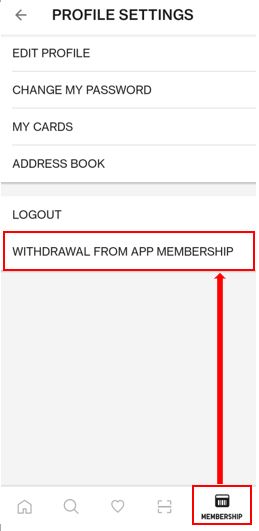
1. You may delete the UNIQLO app account by selecting "My Account" then select "Withdraw from App Membership" then
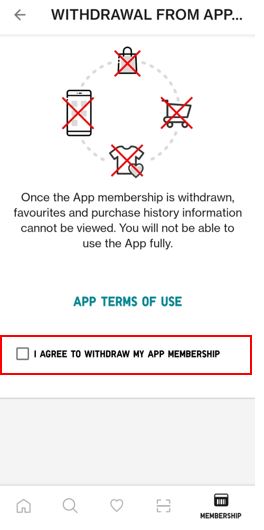
2. Select "I agree to delete my APP Account" to complete the process.
3. Then select withdrawal
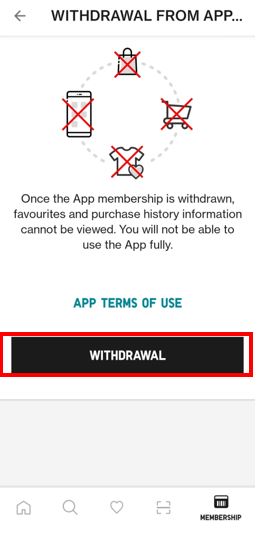
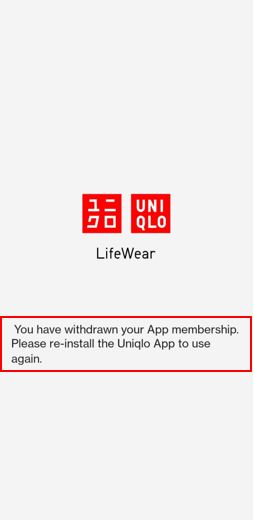
4.Once its submitted and final page
Let us know how we can improve our app or our services by contacting our Customer Center via email, phone, or chat through the Contact Us page.
As a reminder, once you have registered an account using your e-mail address, you cannot reuse the same e-mail in order to create a new Uniqlo account
1. You may delete the UNIQLO app account by selecting "My Account" then select "Withdraw from App Membership" then
2. Select "I agree to delete my APP Account" to complete the process.
3. Then select withdrawal
4.Once its submitted and final page
Let us know how we can improve our app or our services by contacting our Customer Center via email, phone, or chat through the Contact Us page.
As a reminder, once you have registered an account using your e-mail address, you cannot reuse the same e-mail in order to create a new Uniqlo account
Contact UNIQLO India
 CHAT SUPPORT
Live Chat Support is available Mon-Sun, 10 am-5 pm
(Including Public Holidays & Weekend)
(Including Public Holidays & Weekend)
By Email
Our Customer Care team will get back to you within 1 business day.