First time - How to Order Online
Please kindly refer below for the steps on how to order at UNIQLO online shop:
- Log in to your UNIQLO account by go click icon
, then click "Profile". If you do not have a UNIQLO account, you can register first.
- Search of the product that you want. You can refer to the link here for its steps.
- Click on the product that you want for the product details.
- Select the color, size and quantity* of the product that you want and then "ADD TO CART"
*NOTE
- The stock quantity and status that are shown on the product page as below is Online stock (stock in our online warehouse) not store's stock.
- If the product's color and/or the size cannot be selected and added to the cart, it means the product cannot be ordered online due to the stock is not available / out of stock in UNIQLO Online although the product is available at the store.
- Go to 🛒 (cart)
- Click "CONTINUE CHECKOUT"
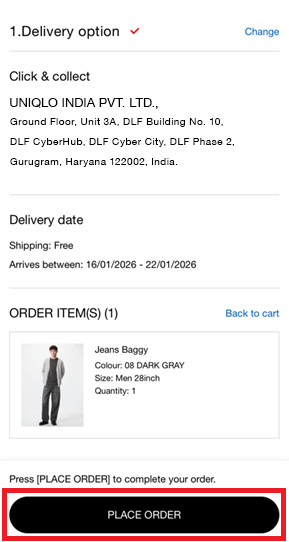
- Choose the delivery method that you desire: (Home Delivery/Click & Collect) (Ship to Address* (delivery to your house/address)).
- Click "CONTINUE".
- Choose the Payment Method. You can choose Credit Card, Debit Card, UPI.
- Click "CONTINUE"
- Check ALL the order details from the Delivery method, product details (color, size and quantity) and the payment method. If ALL details are correct, click "PLACE ORDER". Once you click it, ALL order details cannot be changed and the order can be cancelled only within 30 mins of placing your order.
Contact UNIQLO India
 CHAT SUPPORT
Live Chat Support is available Mon-Sun, 10 am-5 pm
(Including Public Holidays & Weekend)
(Including Public Holidays & Weekend)
By Email
Our Customer Care team will get back to you within 1 business day.